This is my philosophy when surfing the forums. This is also a reason why I started this blog.
Because having two people arguing over which color looks better always results in an extended flame war. (Replace "which color looks better" with any topic of your choice)
They're total idiots, complete morons to you. But in the same way you look like total idiots to them. Although real life decides which is the idiot.

Thursday, August 6, 2009

Sunday, August 2, 2009
Splitting/cutting MKV files - finally!
For very long, there wasn't anything useful on this page. Which went against my philosophy of blogging. Which is to write information that cannot be found elsewhere, and hopefully be useful.
One day I decided to face again a problem which I've had for years and finally found a solution for it. It was such a long problem because nobody had written a solution that could be found by me. Ironically it would've been so easy for regular encoders/muxers that they wouldn't be bothered to write a guide for it.
So here I am, writing the solution for people who did not have a chance to come across it yet.
By split I mean extracting out a segment of the video from the MKV file, with subtitles, multiple audio tracks and whatever that can be stuffed into an MKV container, extract it into another MKV file (for proper H.264, subtitles support), without reencoding. Not Haali Media Splitter mind you. Those are DirectShow splitters.
We need 3 (or 4) programs for this -
- AVISynth
- AVISynthesizer (optional)
- VirtualDub/VirtualDubMod
- MKVtoolnix w/mkvmerge GUI (again, the GUI part is optional, but only if you're super hardcore programmer)
With some skills you can probably replace AVISynth to VirtualDub with Windows Media Player, but we're looking at accuracy and reliability here.
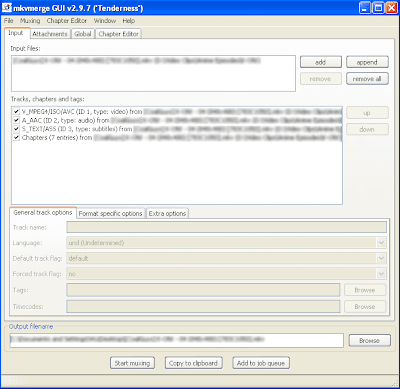
This is what you see when you open the file in mkvmerge GUI.
Go to the Global tag.
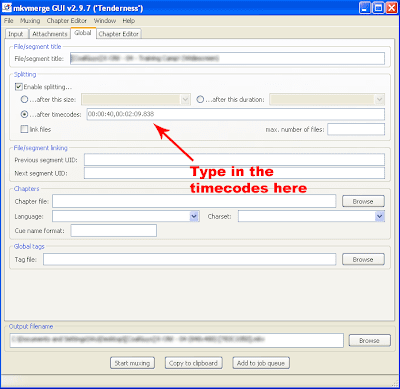
This is where you insert the timecodes.
Frankly, I don't know how to explain what timecode is. But frankly, if you didn't know what timecode is and cannot understand it just by looking, you shouldn't attempt in any form of video encoding or editing.
What will happen is that mkvmerge will split the file into three segments - the part before what you want, the part of what you want, and the part after what you want. You can delete the part before, and abort muxing the part after, hence leaving just the part you want.
Now... where to get the timecodes?
That's where VirtualDub comes in:
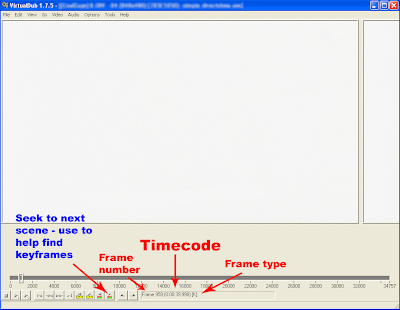
This is the start of the segment that I want
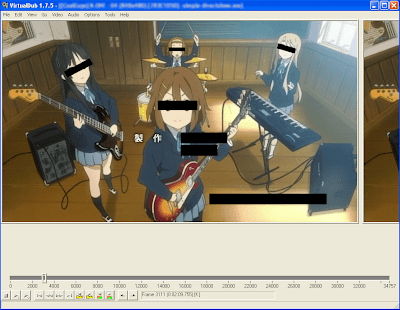
This is the end - take down the timecodes. Take note - mkvmerge requires the timecode to be in HH:MM:SS.nnn format, unlike H:MM:SS.nnn in VirtualDub. Change accordingly.
But you cannot just open any file in VirtualDub. That's where AVISynth (and AVISynthesizer) comes in handy. You can find guides on AVISynth easily, and I have a guide on AVISynthesizer here but the image has been deleted by ImageShack - do not use ImageShack for any long-term image hosting.
So there you go - open the file in VirtualDub, search for the start and end of what you want, but instead of clicking Save as AVI write down the timecodes of the frames (or the frame before that frame - see below)
Issues on keyframes
As you seasoned cutters/joiners know, Direct Stream Copy (or no reencoding) means the video has to start on a keyframe. If you start on a non-keyframe, either the starting is skipped to the next keyframe, or pushed forward to the previous keyframe, depending on the program.
mkvmerge uses the first keyframe after whichever frames you selected as the start and end of the segment. Even if that frame happens to be a keyframe also (? - not sure, needs to be verified), which people would instinctively select. i.e.
Example -
I select frames 100-500.
Frames 100, 200 and 600 are keyframes.
The segment starts from frame 200 and ends on 600.
It's dumb, I know. But this thing isn't meant to be a cutter in the first place.
So instead of selecting frame 100, start with the frame before it e.g. frame 99 instead.
Now how to know which are the keyframes - since all frames show up as keyframes in VirtualDub - which is correct because AVISynth feeds it uncompressed AVI
Use the Next scene seek function/button in VirtualDub - it's just a scene change detector, but most of the time a keyframe will lie where a scene change is, so it's a good guide. I've seen exceptions however, especially when fading in/out.
Do not use Prev scene seek unless you want to wait for eternity.
Known bugs
Apart from the above mentioned (which isn't technically a bug), there may be some syncing problems at the start of the segment, due to the way MKV works as opposed to AVI. Goes away after a few frames however.
One day I decided to face again a problem which I've had for years and finally found a solution for it. It was such a long problem because nobody had written a solution that could be found by me. Ironically it would've been so easy for regular encoders/muxers that they wouldn't be bothered to write a guide for it.
So here I am, writing the solution for people who did not have a chance to come across it yet.
By split I mean extracting out a segment of the video from the MKV file, with subtitles, multiple audio tracks and whatever that can be stuffed into an MKV container, extract it into another MKV file (for proper H.264, subtitles support), without reencoding. Not Haali Media Splitter mind you. Those are DirectShow splitters.
We need 3 (or 4) programs for this -
- AVISynth
- AVISynthesizer (optional)
- VirtualDub/VirtualDubMod
- MKVtoolnix w/mkvmerge GUI (again, the GUI part is optional, but only if you're super hardcore programmer)
With some skills you can probably replace AVISynth to VirtualDub with Windows Media Player, but we're looking at accuracy and reliability here.

This is what you see when you open the file in mkvmerge GUI.
Go to the Global tag.

This is where you insert the timecodes.
Frankly, I don't know how to explain what timecode is. But frankly, if you didn't know what timecode is and cannot understand it just by looking, you shouldn't attempt in any form of video encoding or editing.
What will happen is that mkvmerge will split the file into three segments - the part before what you want, the part of what you want, and the part after what you want. You can delete the part before, and abort muxing the part after, hence leaving just the part you want.
Now... where to get the timecodes?
That's where VirtualDub comes in:

This is the start of the segment that I want

This is the end - take down the timecodes. Take note - mkvmerge requires the timecode to be in HH:MM:SS.nnn format, unlike H:MM:SS.nnn in VirtualDub. Change accordingly.
But you cannot just open any file in VirtualDub. That's where AVISynth (and AVISynthesizer) comes in handy. You can find guides on AVISynth easily, and I have a guide on AVISynthesizer here but the image has been deleted by ImageShack - do not use ImageShack for any long-term image hosting.
So there you go - open the file in VirtualDub, search for the start and end of what you want, but instead of clicking Save as AVI write down the timecodes of the frames (or the frame before that frame - see below)
Issues on keyframes
As you seasoned cutters/joiners know, Direct Stream Copy (or no reencoding) means the video has to start on a keyframe. If you start on a non-keyframe, either the starting is skipped to the next keyframe, or pushed forward to the previous keyframe, depending on the program.
mkvmerge uses the first keyframe after whichever frames you selected as the start and end of the segment. Even if that frame happens to be a keyframe also (? - not sure, needs to be verified), which people would instinctively select. i.e.
Example -
I select frames 100-500.
Frames 100, 200 and 600 are keyframes.
The segment starts from frame 200 and ends on 600.
It's dumb, I know. But this thing isn't meant to be a cutter in the first place.
So instead of selecting frame 100, start with the frame before it e.g. frame 99 instead.
Now how to know which are the keyframes - since all frames show up as keyframes in VirtualDub - which is correct because AVISynth feeds it uncompressed AVI
Use the Next scene seek function/button in VirtualDub - it's just a scene change detector, but most of the time a keyframe will lie where a scene change is, so it's a good guide. I've seen exceptions however, especially when fading in/out.
Do not use Prev scene seek unless you want to wait for eternity.
Known bugs
Apart from the above mentioned (which isn't technically a bug), there may be some syncing problems at the start of the segment, due to the way MKV works as opposed to AVI. Goes away after a few frames however.
Monday, July 27, 2009
Idolm@ster coming to DS: Part two
...ok, so I was wrong, it is going to have 3D.
I just saw a picture of the 3D concert here:
http://nds.tgbus.com/news/etc/200907/20090722152656.shtml
The movie is obviously faked and pre-rendered - since when DS has lighting effects, if the amount of detail isn't an obvious giveaway. But look at the pictures. Those look believable. Then again, considering the graphics power of the DS, we'll still in for some trouble. 120 thousand polygons per second versus 33 million on the PSP...
And something strange isn't it... if they have 3D, why do they have normal conversations in 2D? Why not in 3D like the previous 4 generations of IdolM@ster series?
I just saw a picture of the 3D concert here:
http://nds.tgbus.com/news/etc/200907/20090722152656.shtml
The movie is obviously faked and pre-rendered - since when DS has lighting effects, if the amount of detail isn't an obvious giveaway. But look at the pictures. Those look believable. Then again, considering the graphics power of the DS, we'll still in for some trouble. 120 thousand polygons per second versus 33 million on the PSP...
And something strange isn't it... if they have 3D, why do they have normal conversations in 2D? Why not in 3D like the previous 4 generations of IdolM@ster series?
Lady user
Seriously... what's the point of saying "Lady user" in sales ads? Lady user = take better care of their things issit?
If they dun scratch up their things by dumping everything into their handbags.
I've seen ladies that are rowdy. I have seen gentlemen that take good care of their things too.
Heck, I see more males spending time to polish their cars (or LCD screens) on their weekends. I seldom see females do that.
Because it is the male spirit. It's in our genes. To love something.
And the best part is that when you deal the seller turns out to be a he instead. Maybe it's a she-male, wouldn't know.
If they dun scratch up their things by dumping everything into their handbags.
I've seen ladies that are rowdy. I have seen gentlemen that take good care of their things too.
Heck, I see more males spending time to polish their cars (or LCD screens) on their weekends. I seldom see females do that.
Because it is the male spirit. It's in our genes. To love something.
And the best part is that when you deal the seller turns out to be a he instead. Maybe it's a she-male, wouldn't know.
Wednesday, July 22, 2009
Actually... what is a tube DAC?
Tube DAC tube DAC, this term keeps popping up now and then, people choosing them for either the tube sound or the tube presence.
What would be the most accurate thing to be called a tube DAC?
Tube, like transistors, are semiconductor devices. You can make a computer out of it.
So instead of using an IC containing tonnes of transistors, you use individual tubes to make the DAC stage instead. Tonnes of individual tubes.
And that's why tubes are never used in computers anymore.
So a tube DAC doesn't exist.
What we have are IC DACs with a tube buffer.
If one argue that since it is a DAC with a tube inside can be called a tube DAC, I can say that a chip amp with a tube inside can be called a tube amp. Some people will go crazy over this statement. But it's the same logic.
Of course, some people think that a hybrid amp is the same as a tube amp. I won't try to argue further. I never do in pointless situations.
What would be the most accurate thing to be called a tube DAC?
Tube, like transistors, are semiconductor devices. You can make a computer out of it.
So instead of using an IC containing tonnes of transistors, you use individual tubes to make the DAC stage instead. Tonnes of individual tubes.
And that's why tubes are never used in computers anymore.
So a tube DAC doesn't exist.
What we have are IC DACs with a tube buffer.
If one argue that since it is a DAC with a tube inside can be called a tube DAC, I can say that a chip amp with a tube inside can be called a tube amp. Some people will go crazy over this statement. But it's the same logic.
Of course, some people think that a hybrid amp is the same as a tube amp. I won't try to argue further. I never do in pointless situations.
Sunday, July 19, 2009
Don't we love it when noobs respond to pros and try to act pro and treat the pros like noobs on the internet?
But I think you know that already.
Can't we just strangle all the noobs?
Can't we just strangle all the noobs?
Subscribe to:
Posts (Atom)
