Edit: I notice this post is still frequently visited today. This post was written by me a while ago and it does not meet the standard I require my posts to have now. I'll be frank - to the me of today (2011, but I noticed the situation in 2010, possibly even earlier), this post is full of bull. Just as non-controlled-tested subjective reviews are. More-significant uncontrolled variables swamp any potential difference from the device being tested, and differences heard are wrongly attributed to the device. And I'm not even talking about placebo yet, which many open-minded believers somehow do not believe in its effects.
But I know there are those of you who want to read this review. So I have left the original post untouched below. I just want to make clear the issues with such a review. Subjective reviews are fine, but only if the mentioned differences are tested to reliably exist. And most subjective reviews never test that.
So I got a pair of LM4562 op-amp for my Zhaolu DAC three days ago. This is the most important mod in the series of possible mods because it's like everyone on the net with a Zhaolu is saying that this is a very good upgrade, the others being OPA2107, OPA2134 (or 2132, both not as good as the rest though), LT1469, the king of op-amps (and overly expensive) OPA627, and discreet op-amp stages like the Zapfilter.
(I don't think AD was mentioned because of the nature of the sound and that of Zhaolu, both being very cold)
I chose this because it's almost on the same level as OPA2107 (and some say OPA627) and LT1469, and most importantly it costs the cheapest at $13+ for a pair. This amount can only get you at most one of the cheaper alternatives and less than half of an OPA627 set. And why people would want to spend so much on 4 OPA627s or even a Zapfilter on such a cheap DAC beats me.
Now now, while we're on this topic I might as well talk about why sometimes somebody (or rather a whole group of people) will say that certain op-amp is good while in other applications the said op-amp is crap.
Firstly, op-amps are not perfect and they change the sound signature (which some may like) i.e. different (brands of) op-amps sound different. Different brands of DAC chips sound different also. Different components/implementations sound different too. So a good balance and combination of components that can work in harmony is needed.
Furthermore, different op-amps will perform differently for different uses. In many cases we're talking about voltage buffer, or more commonly known as output/preamp stage. Then there's op-amps for headphones, and op-amps in the power circuitary.
Ok, back to the LM4562, how will this fast and "fast sounding" - what the heck is that? op-amp change the sound of my system?
Just installed:
It sounds... bad. The bass is greatly reduced, the trebles are too bright and sharp. Somebody played with the tone controls here?
However, the trebles are indeed clearer and cleaner and I can hear a bit more instruments. But this induces ear fatigue and I also don't like the loss in bass power. Dynamics is seriously lacking.
Soundstage is slightly wider as mentioned on the web, the notes are clearer but they sound more tonal and I cannot hear the rest of the instruments like impact sound and harmonics. Even my brother is saying that it sounds fake.
That's a lot of sacrifice just for that bit of more musical and "faster" details. And I can't say that it sounds more musical either, since the instruments now sound fake.
After a few days and a few hours of burn-in:
After I came back from camp I listened and was like huh, was this that LM4562 I've just installed yesterday? Or have my ears gotten used to the sound already? The fakeness and harshness is gone and now I'm listening to something that sounds much more normal. The treble has reduced in volume, but the details are still there and clear as ever. The high-frequency hitting sounds are now like free-of-charge, and the bass has more power. Not to be confused with the darker/warmer sound-signature of the Burr-Browns, this LM4562 has an interesting sound; lots of dynamics cannot explain it all - when it's supposed to be loud it's loud, when it's supposed to be soft it's soft. So in some songs the bass (and mid-bass) is just powerful as needed, while in others the amount is just right. At the same time the bass does not sound muffled at all but instead it's punchy, tight, and full of details; I can clearly hear the distortion of the guitar.
So that's the meaning of a "fast" op-amp. Responsive and detailed is a better and more accurate term to describe it.
I love this sound signature, since I'm of a "detail" and "purist", or "natural" person when it comes to frequency response. Don't give me something that's too dark all the time, I'll hate it. Although you can give me as big as soundstage as possible. This, is one part, I'll admit that I'm totally not pure. :)
This may also be the reason why the LM4562 is called "too-dark" in certain applications, for example the Zero DAC, which is said to be very warm in the first place. If the LM4562 decides to amplify that warmness, then whoops, you got a very dark sound.
However, in the case of Zhaolu, LM4562 is less warm than the OPA2604 and other Burr-Brown chips, and sounds more natural.
And still the best part about the LM4562 is the tonality, which was the only thing that was good before the burn-in. Except now it's even better. The chords are in full harmony, the usually obscured notes especially the high ones are now heard. And yet it doesn't sound any noiser but cleaner instead. It's hard to explain except for hearing it yourself.
Oh ya, and now I can hear the individual notes more clearly too. I guess some people actually hate that, especially when it makes the bass more "one-note", but as a musician I like that.
This is a very good upgrade for $13.80, which is less than 10% of the DAC's cost. I used to be a disbeliever of op-amps, now I stand by them, after knowing how big a difference they can make.

Saturday, August 2, 2008

Thursday, July 31, 2008
Latale Online - OGPlanet English Close Beta out
I'm one of the lucky few(?) that got selected for the close beta test. The lucky few being those who actually knew about this great game while the whole world concentrates on something else.
But it's only for 7 days. How many levels do they expect us to reach?
Well... actually, given just a few hours a day, and provided you know how to level up quickly, at least level 20. Level 30 might even be possible for the hardcore. Cos this game, if you're good, each level only takes at most 3 hours on average, and that's a conservative guess that applies for all levels below 50 which I managed to get before the JP server banned all foreign players. As a shield user, there were a few levels which I managed to level up very fast. And I'm talking about at ~lvl 30 and throughout most of 40+ (Yes the area was that good, for the shields).
And that's one thing I like about this game over Maplestory. MS takes 3 hours on the average per level for each level and that's also a conservative guess, the other way round. I was seeing like 5 hours or something, either that or eternity. And everybody is attacking the same enemies and in the same way, instead of different styles on different enemies that specific classes are more efficient in.
Plus, partying in Latale actually proves to be useful. No, unlike the increased exp in Trickster online, partying in Latale helps by increasing the efficiency of the party as you raid the map in a group. And prevents yourself from getting owned at the same time. And since the experience decreases as your level increases, this is the best way to fight tougher monsters or groups of also tough monsters.
And the best part of this game over Maple is that IT HAS PK!!! Players fight it out in an arena, action style.
Well, not going to blog too much about this yet. I'm going to play my heart out before the outfield on next Monday 4th of August.
But it's only for 7 days. How many levels do they expect us to reach?
Well... actually, given just a few hours a day, and provided you know how to level up quickly, at least level 20. Level 30 might even be possible for the hardcore. Cos this game, if you're good, each level only takes at most 3 hours on average, and that's a conservative guess that applies for all levels below 50 which I managed to get before the JP server banned all foreign players. As a shield user, there were a few levels which I managed to level up very fast. And I'm talking about at ~lvl 30 and throughout most of 40+ (Yes the area was that good, for the shields).
And that's one thing I like about this game over Maplestory. MS takes 3 hours on the average per level for each level and that's also a conservative guess, the other way round. I was seeing like 5 hours or something, either that or eternity. And everybody is attacking the same enemies and in the same way, instead of different styles on different enemies that specific classes are more efficient in.
Plus, partying in Latale actually proves to be useful. No, unlike the increased exp in Trickster online, partying in Latale helps by increasing the efficiency of the party as you raid the map in a group. And prevents yourself from getting owned at the same time. And since the experience decreases as your level increases, this is the best way to fight tougher monsters or groups of also tough monsters.
And the best part of this game over Maple is that IT HAS PK!!! Players fight it out in an arena, action style.
Well, not going to blog too much about this yet. I'm going to play my heart out before the outfield on next Monday 4th of August.
Tuesday, July 29, 2008
Medical shouldn't be commercial
...and I take back my word about that SAF's medical department sucks. But they still don't care about the well-being of their soldiers.
I was referred to this "hearing specialist" by my family clinic to get a hearing test. When I reached the place, a commercial area of various private healthcare and beauty clinics, I knew something was wrong.
The guy does show more concern about the situation than the SAF MO's, but the hearing test was carried in a less professional manner - results written on paper before input into the computer, the number of tests is less, and the scale of the graph will result in the curve always being a straight line. Of course, he probably wouldn't know what's called selective frequency loss, and he called a 5db difference in hearing between left and right "normal". Normal? Fk it, that's at least 3 times as loud on a logarithmic scale. He obviously doesn't know his stuff.
And sure I know why. When I went outside, I saw his certificate. "University of Queensland - Advanced Diploma". Fuck, I'm consulting a polytechnic-equivalent in Singapore context. And the University of Queensland to boot - the last time I visited them after Exercise Wallaby I wondered if it could provide any decent level of education. Well, their Rockhampton town campus, but that campus has a medical school so it's still relavant. At any rate, I already know more than him on my condition.
And the best part?
I'm paying him $50 for the test.
The family clinic only charges $20 for consultation and the doctor holds a degree from NUS, which is like the best in the region for medical education.
So just by a nice shopfront in a golden district and of course, the "specialist" title, you expect people to pay you much more?
Which is why, I feel that medical shouldn't be commercialized. When it comes to making money, people ignore the actual work and performance and focus on things in a business-like manner. Hello~, we're dealing with lives here.
Now I totally understand why the doctors working in the public sector are always grumpy. Yes, life sucks isn't it? Y'all are one of the best out there yet you are looking at so many small cases for only $3000 per month. Stupid bond period. But that's where you get the money for your expensive studies and that's how the government gets good doctors to look at poor patients. The government did a good job here, although the attitude and hence treatment of patients still needs improvement.
And one thing for sure - the staff of the "specialist" clinic were all very happy to see their patients. At $50 per visit, who wouldn't?
Oh the power of money.
I was referred to this "hearing specialist" by my family clinic to get a hearing test. When I reached the place, a commercial area of various private healthcare and beauty clinics, I knew something was wrong.
The guy does show more concern about the situation than the SAF MO's, but the hearing test was carried in a less professional manner - results written on paper before input into the computer, the number of tests is less, and the scale of the graph will result in the curve always being a straight line. Of course, he probably wouldn't know what's called selective frequency loss, and he called a 5db difference in hearing between left and right "normal". Normal? Fk it, that's at least 3 times as loud on a logarithmic scale. He obviously doesn't know his stuff.
And sure I know why. When I went outside, I saw his certificate. "University of Queensland - Advanced Diploma". Fuck, I'm consulting a polytechnic-equivalent in Singapore context. And the University of Queensland to boot - the last time I visited them after Exercise Wallaby I wondered if it could provide any decent level of education. Well, their Rockhampton town campus, but that campus has a medical school so it's still relavant. At any rate, I already know more than him on my condition.
And the best part?
I'm paying him $50 for the test.
The family clinic only charges $20 for consultation and the doctor holds a degree from NUS, which is like the best in the region for medical education.
So just by a nice shopfront in a golden district and of course, the "specialist" title, you expect people to pay you much more?
Which is why, I feel that medical shouldn't be commercialized. When it comes to making money, people ignore the actual work and performance and focus on things in a business-like manner. Hello~, we're dealing with lives here.
Now I totally understand why the doctors working in the public sector are always grumpy. Yes, life sucks isn't it? Y'all are one of the best out there yet you are looking at so many small cases for only $3000 per month. Stupid bond period. But that's where you get the money for your expensive studies and that's how the government gets good doctors to look at poor patients. The government did a good job here, although the attitude and hence treatment of patients still needs improvement.
And one thing for sure - the staff of the "specialist" clinic were all very happy to see their patients. At $50 per visit, who wouldn't?
Oh the power of money.
Monday, July 28, 2008
Auto-control your fan speeds - SpeedFan
Firstly, you need to know about this useful little program called SpeedFan here. A search on Google or Yahoo will give better and more detailed reviews and guides, so I won't include those.
However, a lot of users do not know how to make this automatic, from turning on at startup and reducing the fan speed, to increasing the fan speed when things get too hot and reducing it thereafter. This guide is to cover this. With everything properly set, SpeedFan is far better than most fan controllers out there, and, best of all, it's free.
So here we go. Firstly, set SpeedFan to run at startup by placing its shortcut in the Startup folder in the Start Menu.
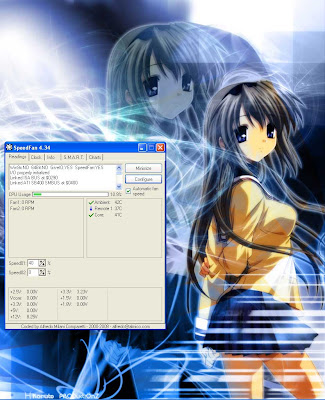
This is what you would see if you run SpeedFan without applying any settings, minus the info messages that you see on first run.
...except the speeds should both be 40% by default, and there will be much more and incomprehensible temperature readings. Depending on your mainboard, many of these will be meaningless, and you will only be interested in Core, Ambient, either one or two of Remote 1/2/3 or 4/5/6/7/8..., and HD0/HD1/HD2...
And actually there is a problem - on some systems, if a temperature of e.g. 127 or -128 (or 0 or 255) degrees celcius is detected by SpeedFan, even if it has no meaning and/or isn't connected to anywhere, the system will shut down in a minute or a few seconds, so act fast to remove the problematic readings.
You see the Speeds, but you're not going to touch them, since they will be automated after SpeedFan is configured. However, you must check Automatic Fan Speed for the speed to change automatically. It's useful to have that option so accessible, since sometimes you'll want the full or no power for overclocking/silent operation.
To configure SpeedFan, click the, erm, Configure button.
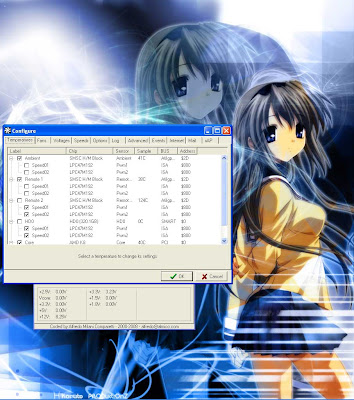
You see various temperatures and their sub-menus, which are Speed01 and Speed02. If you tick a temperature, it shows up on SpeedFan. If you tick the Speed in the sub menu, it means if that temperature is too high it will affect the speed. You can choose one or more or nil temperature to be affecting a certain speed.
When you click on a temperature, you can set the desired and warning temperatures. Plus whether it shows up in the system tray or is logged.
Your fan speeds will be at the minimum value if all related temperatures are below desired, will ramp up to the maximum value when between desired and warning, and go to 100% at warning temperature. Take note of how this works, and choose your temperatures wisely.
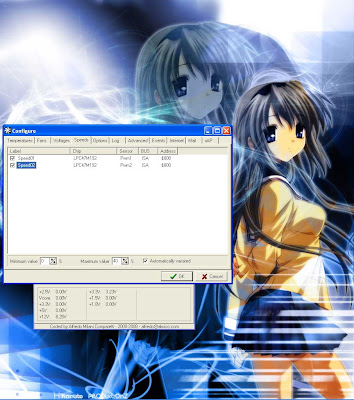
Next tab, Speeds, if you click on a speed, you see the minimum and maximum values they will be at. Plus whether to make it automatically varied.
The use of minimum and maximum values has just been explained earlier.
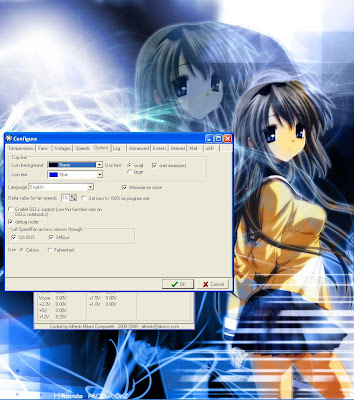
Since we're making it start on startup, it would be nice to start SpeedFan minimized so that it does not pop up and bug you. It is also nice to minimize on close since it's human nature to click close and for the case of SpeedFan, it really will close if the minimize on close option isn't checked.
Delta value for fan speeds - this allows how precise you can set your fan speed and also affects how fast the fan speed changes automatically. Lower values means a slower change.
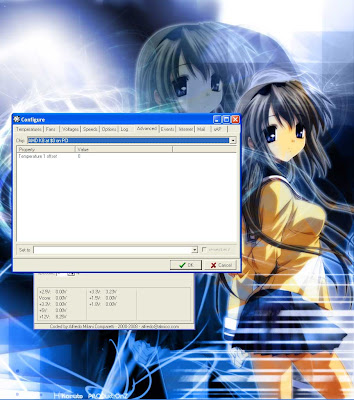
This Advanced tab is interesting, as advanced settings usually are. You can select the monitoring chip and change it's settings. In this case I'm showing my CPU, which gives the Core reading. Are we seeing something something interesting here? Temperature offset! Good for calibrating the sensor so that the temperature is accurate.
For the mainboard H/M (hardware monitoring) block, sometimes you can even choose which sensor to use for the different Remote readings.
Update 14/08/2011 -

Now, some explanations on the terms/logos:
Flame on the temperature means too hot (above warning), and all fans will be set to 100%
Red on the temperature means getting hot or a temperature increase. Affected fans will be set to maximum value
A green tick means temperatures are ok and stablized. Fan speeds will be minimum if this temperature is around or below desired temperature
A blue tick means temperatures are way below desired or decreasing. No problem here. Fan speeds will be at minimum
Core usually means the reading from the sensor inside the CPU, which will give the same reading as CoreTemp or other such programs that read this temperature
Remote1 usually means mainboard CPU temperature sensor, while Remote2 is northbridge/ambient temperature, although sometimes their roles shuffle around. I even had a Remote3 as CPU before. To know which is the CPU, just do a Prime95 and see which rises.
HD0 = first HDD, HD1 = 2nd HDD etc. Tends to be accurate because HDD temperatures are taken from S.M.A.R.T. i.e. the sensor system on your HDDs, there's no chance for non-standardized mobos to screw things up.
Speed01 and Speed02 - while this depends on your mainboard and where you plugged the fans to, so far my experience is that Speed02 is usually the CPU fan while Speed01 is the system/power fan or no effect. Again, to know which is which, just test. *Hint - CPU fan is always the fastest (and noisiest)
There you go. Enjoy your automatic speed control. :)
However, a lot of users do not know how to make this automatic, from turning on at startup and reducing the fan speed, to increasing the fan speed when things get too hot and reducing it thereafter. This guide is to cover this. With everything properly set, SpeedFan is far better than most fan controllers out there, and, best of all, it's free.
So here we go. Firstly, set SpeedFan to run at startup by placing its shortcut in the Startup folder in the Start Menu.

This is what you would see if you run SpeedFan without applying any settings, minus the info messages that you see on first run.
...except the speeds should both be 40% by default, and there will be much more and incomprehensible temperature readings. Depending on your mainboard, many of these will be meaningless, and you will only be interested in Core, Ambient, either one or two of Remote 1/2/3 or 4/5/6/7/8..., and HD0/HD1/HD2...
And actually there is a problem - on some systems, if a temperature of e.g. 127 or -128 (or 0 or 255) degrees celcius is detected by SpeedFan, even if it has no meaning and/or isn't connected to anywhere, the system will shut down in a minute or a few seconds, so act fast to remove the problematic readings.
You see the Speeds, but you're not going to touch them, since they will be automated after SpeedFan is configured. However, you must check Automatic Fan Speed for the speed to change automatically. It's useful to have that option so accessible, since sometimes you'll want the full or no power for overclocking/silent operation.
To configure SpeedFan, click the, erm, Configure button.

You see various temperatures and their sub-menus, which are Speed01 and Speed02. If you tick a temperature, it shows up on SpeedFan. If you tick the Speed in the sub menu, it means if that temperature is too high it will affect the speed. You can choose one or more or nil temperature to be affecting a certain speed.
When you click on a temperature, you can set the desired and warning temperatures. Plus whether it shows up in the system tray or is logged.
Your fan speeds will be at the minimum value if all related temperatures are below desired, will ramp up to the maximum value when between desired and warning, and go to 100% at warning temperature. Take note of how this works, and choose your temperatures wisely.

Next tab, Speeds, if you click on a speed, you see the minimum and maximum values they will be at. Plus whether to make it automatically varied.
The use of minimum and maximum values has just been explained earlier.

Since we're making it start on startup, it would be nice to start SpeedFan minimized so that it does not pop up and bug you. It is also nice to minimize on close since it's human nature to click close and for the case of SpeedFan, it really will close if the minimize on close option isn't checked.
Delta value for fan speeds - this allows how precise you can set your fan speed and also affects how fast the fan speed changes automatically. Lower values means a slower change.

This Advanced tab is interesting, as advanced settings usually are. You can select the monitoring chip and change it's settings. In this case I'm showing my CPU, which gives the Core reading. Are we seeing something something interesting here? Temperature offset! Good for calibrating the sensor so that the temperature is accurate.
Update 14/08/2011 -

I noticed on this mobo that the PWM mode is defaulted to SmartGuardian, which when selected will not follow SpeedFan's settings. Software controlled needs to be selected.
Now, some explanations on the terms/logos:
Flame on the temperature means too hot (above warning), and all fans will be set to 100%
Red on the temperature means getting hot or a temperature increase. Affected fans will be set to maximum value
A green tick means temperatures are ok and stablized. Fan speeds will be minimum if this temperature is around or below desired temperature
A blue tick means temperatures are way below desired or decreasing. No problem here. Fan speeds will be at minimum
Core usually means the reading from the sensor inside the CPU, which will give the same reading as CoreTemp or other such programs that read this temperature
Remote1 usually means mainboard CPU temperature sensor, while Remote2 is northbridge/ambient temperature, although sometimes their roles shuffle around. I even had a Remote3 as CPU before. To know which is the CPU, just do a Prime95 and see which rises.
HD0 = first HDD, HD1 = 2nd HDD etc. Tends to be accurate because HDD temperatures are taken from S.M.A.R.T. i.e. the sensor system on your HDDs, there's no chance for non-standardized mobos to screw things up.
Speed01 and Speed02 - while this depends on your mainboard and where you plugged the fans to, so far my experience is that Speed02 is usually the CPU fan while Speed01 is the system/power fan or no effect. Again, to know which is which, just test. *Hint - CPU fan is always the fastest (and noisiest)
There you go. Enjoy your automatic speed control. :)
This blog's been useless lately...?
I noticed the deviation of this blog from the original informative guide blog to a normal blog. Not good.
To make up for it, I'll be posting a guide on how to use SpeedFan such that it's fully automated and blends into the background. Stay tuned!
To make up for it, I'll be posting a guide on how to use SpeedFan such that it's fully automated and blends into the background. Stay tuned!
Sunday, July 27, 2008
Anime Music on a Hi-Fi system, How's That?
I'm going to use this as my sub-title. Just to make a statement. Plus, I do listen to Anime music on a Hi-Fi (recently considered to be one after upgrades) system. In fact, I've been listening to Anime music since 2002.
Anime music actually benifits much more from having a good sound system than other pop music genres, because of its complexity. The abusive use of high notes and complex beats (which my brother hates a lot) coupled with lots of chords makes the songs very damanding on the speakers (and ears). And this complexity is exactly what I like about it. The melody may be simple, well, used to be, but there still are simple ones, but the chord progression and syncopation can get very complex. Complexity combined with simpleness, sweet, the direct opposite of Mendo-pop.
I suddenly had this thought when listening to Da Capo II ~Asaki Yumemishi-kun to~ by yozuca. Because after the recent cable upgrade some of the high notes are finally clear. So it occurred to me that Anime music actually requires a good system for optimal enjoyment. The fact that I'm noticing lots of improvement each upgrade for this genre as opposed to the other genres (apart from Classical or Neo-classical and related) already says something.
Yea, I've always been proud of this genre. Because it's technically superior and the composers/arrangers are all god-like creatures that received proper music education and can do any genre you ask. True Anime music don't come with the popular/"popular" mainstream series's btw, they come from non-mainstream shows, games (hentai or otherwise), doujin works, written by people dedicated to writing Anime-style music for true supporters of the series. There are lots more good Anime songs out there than I/you might possibly know, just waiting to be discovered.
So stand out and be proud instead of being embarrassed/having an inferiority complex. There's nothing wrong in listening to Anime music. Stand up tall and shout "I LISTEN TO ANIME MUSIC BECAUSE I LIKE IT!!!".
P.S. Mizuki Nana pwnzors lots of singers out there, even though she started out as a seiyuu (voice actress). And I've Sound pwnz the world as the best music group that's also a production group, in both singing and songwriting. And similarly they started out working for *ahem* products. Can you see the potential that lies beneath the *ahem*?
Anime music actually benifits much more from having a good sound system than other pop music genres, because of its complexity. The abusive use of high notes and complex beats (which my brother hates a lot) coupled with lots of chords makes the songs very damanding on the speakers (and ears). And this complexity is exactly what I like about it. The melody may be simple, well, used to be, but there still are simple ones, but the chord progression and syncopation can get very complex. Complexity combined with simpleness, sweet, the direct opposite of Mendo-pop.
I suddenly had this thought when listening to Da Capo II ~Asaki Yumemishi-kun to~ by yozuca. Because after the recent cable upgrade some of the high notes are finally clear. So it occurred to me that Anime music actually requires a good system for optimal enjoyment. The fact that I'm noticing lots of improvement each upgrade for this genre as opposed to the other genres (apart from Classical or Neo-classical and related) already says something.
Yea, I've always been proud of this genre. Because it's technically superior and the composers/arrangers are all god-like creatures that received proper music education and can do any genre you ask. True Anime music don't come with the popular/"popular" mainstream series's btw, they come from non-mainstream shows, games (hentai or otherwise), doujin works, written by people dedicated to writing Anime-style music for true supporters of the series. There are lots more good Anime songs out there than I/you might possibly know, just waiting to be discovered.
So stand out and be proud instead of being embarrassed/having an inferiority complex. There's nothing wrong in listening to Anime music. Stand up tall and shout "I LISTEN TO ANIME MUSIC BECAUSE I LIKE IT!!!".
P.S. Mizuki Nana pwnzors lots of singers out there, even though she started out as a seiyuu (voice actress). And I've Sound pwnz the world as the best music group that's also a production group, in both singing and songwriting. And similarly they started out working for *ahem* products. Can you see the potential that lies beneath the *ahem*?
Subscribe to:
Posts (Atom)
